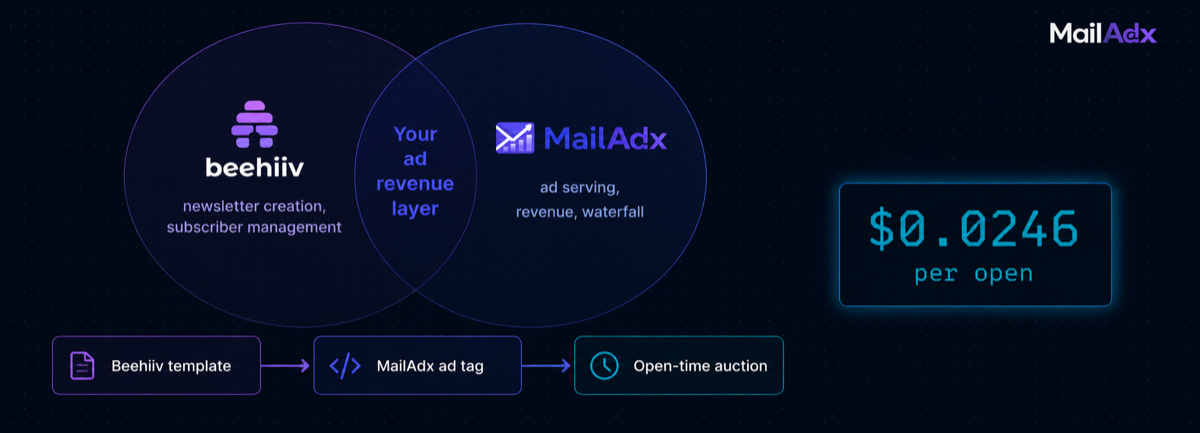
Beehiiv's built-in ad network is a reasonable starting point, but it is not your only option for newsletter ad monetisation. MailAdx integrates with Beehiiv newsletters through the same open-time ad tag approach used with Mailchimp, Klaviyo, and other platforms — giving you access to an independent programmatic waterfall, direct deal management, and granular reporting that Beehiiv's native tools don't offer. This guide explains when and why you might want this, and how to set it up.
What this guide covers:
- Beehiiv's native ads vs MailAdx: when each makes sense
- How MailAdx integration works with Beehiiv
- What you need before starting
- Step 1: Configure subscriber hash in Beehiiv
- Step 2: Create your MailAdx placement
- Step 3: Insert the ad tag into your Beehiiv template
- Step 4: Test and verify
- Running Beehiiv ads and MailAdx in the same newsletter
- Frequently asked questions
Beehiiv's Native Ads vs MailAdx: When Each Makes Sense
Beehiiv's Ad Network provides publisher access to pre-vetted advertisers through a managed marketplace. The proposition is simplicity: Beehiiv handles advertiser relationships, creative review, and payment processing. Publishers apply for campaigns; approved publishers are served ads automatically.
The tradeoffs of Beehiiv's native approach:
Campaign availability is variable. You can only run ads from campaigns that have accepted your newsletter. If no active campaign in Beehiiv's network has approved your publication, your ad slot remains empty — your fill rate is a function of Beehiiv's sales operation rather than of demand conditions in an open marketplace.
CPMs are fixed by Beehiiv's agreements. You receive the CPM that Beehiiv negotiated, not a market-clearing price from an auction. For publishers with high-quality audiences in competitive categories, open programmatic markets typically clear at higher CPMs than fixed-rate managed networks.
You don't control the waterfall. Beehiiv decides which campaign fills your slot. You have limited ability to set floors, configure category blocks, or prioritise specific advertisers.
MailAdx addresses all three limitations: it connects to an open programmatic marketplace with real-time bidding, allows full floor price and blocklist configuration, and provides a publisher portal with placement-level control and per-send reporting.
The choice isn't binary. Depending on Beehiiv's template architecture, some publishers run both — Beehiiv native ads in a dedicated slot and MailAdx in a separate placement. Others replace Beehiiv's ad slot entirely with MailAdx. Which approach works depends on your Beehiiv plan tier and template customisation access.
For context on how MailAdx fits into the broader landscape of newsletter platforms, see MailAdx vs Beehiiv.
How MailAdx Integration Works with Beehiiv
The integration uses the same architecture as all other ESP integrations on MailAdx: an <img> tag in your email template that requests the MailAdx ad server when a subscriber opens. The ad server receives the request, runs the waterfall, and returns the appropriate creative.
Beehiiv supports custom HTML blocks in its email templates (on Scale and Enterprise plans). These blocks allow insertion of raw HTML including ad tags with subscriber-specific merge variables.
Beehiiv's native subscriber hash variable — {{subscriber.email_sha256}} — provides the SHA-256 hash of each subscriber's email address for inclusion in the ad URL. No additional configuration is required to enable this variable; it is available natively in Beehiiv's templating system.
This is the same privacy-first approach used across all MailAdx integrations: no raw email addresses are transmitted, only the irreversible hash. Full detail on why this matters is covered in the email hash targeting guide.
What You Need Before Starting
- A Beehiiv account on the Scale plan or higher (required for custom HTML template blocks)
- An active newsletter with at least one existing template
- A MailAdx publisher account (create one at mailadx.com/signup)
The Beehiiv free and Grow plans do not support custom HTML in email templates. If you are on one of these plans, the options are: upgrade to Scale, use Beehiiv's built-in ad network only, or consider migrating to an ESP with more template customisation flexibility. The ESP integration overview covers alternative platforms.
Step 1: Configure Subscriber Hash in Beehiiv
Beehiiv provides the subscriber email hash natively via its merge variable system. The variable {{subscriber.email_sha256}} returns the lowercase SHA-256 hex hash of each subscriber's email address at send time.
You do not need to configure this separately — it exists in every Beehiiv account. The variable is substituted per-subscriber when your newsletter sends, meaning each subscriber receives an ad tag URL containing their unique hash. No raw email addresses appear in the outbound email.
Before building the full integration, verify the variable works by inserting it into a test email and checking that it renders as a hex string (64 alphanumeric characters) rather than the raw variable text. If you see the literal string {{subscriber.email_sha256}}in the received email, the template block is not processing merge variables — check that you're using a Custom HTML block rather than a standard content block.
Step 2: Create Your MailAdx Placement
Log into the MailAdx publisher portal and navigate to Placements. Click "New Placement" and configure:
Placement key: A short URL-safe identifier, e.g. beehiiv_headeror header.
Ad sizes: Beehiiv email templates are typically 600px wide. Standard sizes: 600×90px for a header banner, 600×150px for a mid-content rectangle.
Floor CPM: Your minimum acceptable CPM. Start with the recommended floor for your niche from the floor CPM guide— usually $10–20 CPM for first deployment, with planned incremental increases as fill-rate data accumulates.
Category blocks: Configure any advertiser categories you want to exclude from your newsletter. See the category blocks guidefor how to configure these without over-restricting fill.
After saving, the portal displays your ad tag — copy it for Step 3.
Step 3: Insert the Ad Tag into Your Beehiiv Template
In Beehiiv's newsletter editor, add a Custom HTML block at the position where you want the ad to appear. In the HTML block, paste your ad tag with the Beehiiv subscriber hash variable in the eh parameter:
<!-- MailAdx placement -->
<table width="100%" cellpadding="0" cellspacing="0" border="0">
  <tr>
    <td align="center" style="padding:12px 0;">
      <img
        src="https://ads.mailadx.com/serve
          ?pub=YOUR_PUBLISHER_ID
          &pk=header
          &eh={{subscriber.email_sha256}}"
        width="600"
        height="90"
        alt=""
        style="display:block;border:0;max-width:100%;"
      />
    </td>
  </tr>
</table>
<!-- End MailAdx placement -->
Replace YOUR_PUBLISHER_ID with your MailAdx publisher ID (visible in the publisher portal dashboard) and adjust width/height to match your configured placement size.
Save the template. The ad tag is now embedded for all future sends from this template. No per-campaign action is required.
Step 4: Test and Verify
Send a test newsletter from Beehiiv to your own email address. Open the email and verify:
The subscriber hash was substituted: View the image source URL in your email client. The eh parameter should contain a 64-character hex string, not the literal text {{subscriber.email_sha256}}.
An impression appears in MailAdx reporting: Log into your MailAdx reporting dashboard. After opening the test email, an impression should appear within a few minutes for your placement. If you see a house ad (your configured fallback), paid impressions are not yet filling — this is normal during initial setup and will resolve as your account accumulates audience data and demand targeting improves.
Common test issues: If the hash variable is not substituted, confirm the HTML block is processing merge variables (Beehiiv sometimes requires enabling variable processing on custom HTML blocks explicitly). If no impression appears, verify your publisher ID in the ad tag URL exactly matches your MailAdx account identifier.
Running Beehiiv Ads and MailAdx in the Same Newsletter
If you want to run Beehiiv's native ad network in one slot and MailAdx in another, place each in separate template locations. Beehiiv's native ad block handles one position; a MailAdx custom HTML block handles another. Each operates independently with no interference.
The revenue consideration: Beehiiv's native slot earns the managed network rate. The MailAdx slot earns open market programmatic CPMs, potentially supplemented by your own direct sponsors at the top of the waterfall. The combined approach typically earns more per send than either alone, at the cost of additional template complexity.
Publishers who want to compare performance: run each in equivalent placements across a consistent number of sends, then compare verified impressions, effective CPM, and total revenue per placement. The MailAdx reporting dashboard provides the data you need for this comparison on the MailAdx side.
For guidance on optimising multiple placements, see thead unit best practices guide. For maximising fill rate across your full demand stack, see fill rate optimisation and the waterfall setup guide.
Frequently Asked Questions
Do I need the Beehiiv Scale plan specifically, or will a higher tier also work?
Any Beehiiv plan that includes custom HTML blocks in email templates will work. As of 2026, this requires Scale plan or above. Beehiiv's plan structure evolves — check their current plan comparison page if you're unsure whether your plan includes template HTML access.
Will adding a MailAdx ad tag affect my Beehiiv email deliverability?
No. The ad tag is a standard HTML image element, structurally identical to any other image in any email. Deliverability is determined by your sending domain reputation, list hygiene, and engagement signals — not by the presence of an image tracking tag. See how open-time ad serving worksfor the technical architecture.
Can I use MailAdx with Beehiiv's paid subscriptions and keep both revenue streams?
Yes. MailAdx advertising and Beehiiv's paid subscription features are completely independent. You can serve MailAdx ads to free subscribers while paid subscribers receive either ad-free content or a different ad configuration — or you can serve ads to all subscribers regardless of subscription status. Configure this in your MailAdx publisher portal by using separate placements or campaign targeting rules.
What is the revenue difference between Beehiiv native ads and MailAdx in practice?
This varies significantly by newsletter niche and current campaign availability. Publishers in competitive advertising categories (B2B SaaS, finance, marketing) typically find MailAdx programmatic CPMs higher than Beehiiv's managed network rates for the same impressions. The difference narrows in lower-CPM niches where Beehiiv's managed relationships with brand advertisers may match or exceed open market rates. The only accurate answer is to test both and compare actual eCPM data.
Add open-time ads to your Beehiiv newsletter
Create a MailAdx placement, insert the ad tag into your Beehiiv template, and see your first impression within 90 minutes.
No minimum subscribers · 0% on direct-sold · Beehiiv Scale plan required


