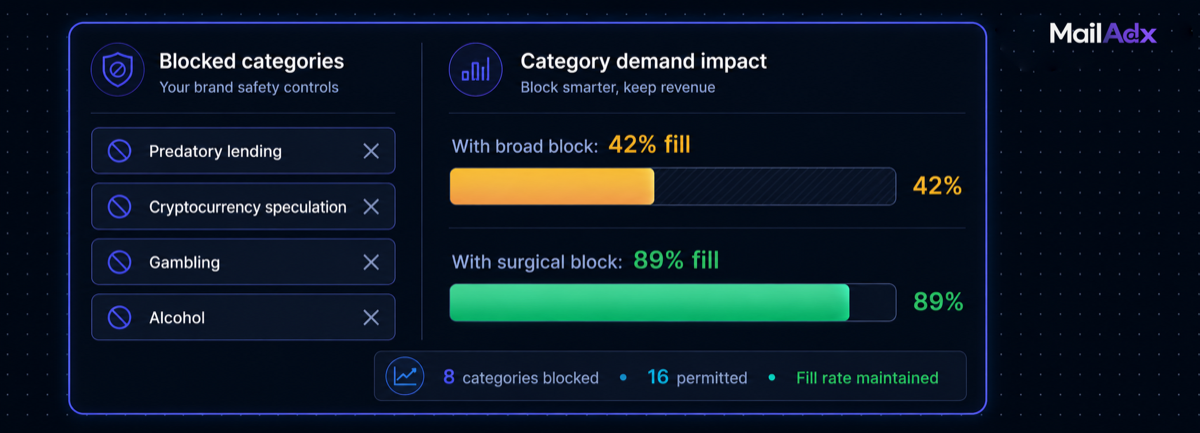
Category blocks are how publishers control which advertisers can and cannot appear in their newsletter. Every publisher needs them — reader trust is the foundation of newsletter value, and irrelevant or harmful advertising destroys it faster than almost any other factor. But misconfigured category blocks are one of the most common causes of avoidable fill rate loss. A publisher who broadly blocks "Finance" has likely eliminated both predatory lending ads (appropriate to block) and SaaS accounting tools (appropriate to allow). This guide shows how to use category controls surgically — protecting readers without quietly killing revenue.
What this guide covers:
- Why category blocks exist and what they protect
- How category blocks work in the MailAdx waterfall
- Blocklist vs allowlist: why one is better than the other
- The over-blocking problem and how to diagnose it
- Surgical blocking: category-level vs advertiser-level
- Recommended blocks by newsletter category
- Measuring the fill rate impact of your blocks
- Frequently asked questions
Why Category Blocks Exist and What They Protect
Newsletter readers are more attentive and less forgiving than web display audiences. A reader who chose to subscribe to a personal finance newsletter has certain expectations about the content and advertising they'll encounter. An ad for a cryptocurrency scheme appearing in that newsletter damages the publisher's credibility in a way that the same ad appearing on a random website does not. The reader's trust in the publisher is the product — and advertising that betrays that trust erodes the value of the entire audience over time.
Category blocks serve as the editorial gate for your advertising. They define which advertiser categories are permitted in your newsletter independent of what programmatic demand is willing to pay. A finance newsletter that blocks cryptocurrency speculation isn't leaving money on the table — it's protecting the reader relationship that makes the newsletter valuable to legitimate finance advertisers at premium CPMs.
This is consistent with how MailAdx's open-time architecture works generally: every design decision favours publisher control and reader-quality impressions over raw volume. Category blocks are the editorial expression of that principle.
How Category Blocks Work in the MailAdx Waterfall
Category blocks operate at the programmatic tiers of the waterfall (Tier 2 and Tier 3). When an advertiser in a blocked category bids for an impression, their bid is excluded from the auction. The impression proceeds as if that advertiser didn't exist — other advertisers compete normally, and if none meet the floor price, the impression falls to house ads.
Tier 1 direct campaigns are not subject to programmatic category blocks. When you manually approve a direct campaign for a specific advertiser in the publisher portal, that advertiser bypasses category checking. Category blocks are designed to screen untrusted demand; direct campaigns represent trusted, individually reviewed advertisers.
Category blocks in MailAdx can be set at two levels:
Account level: Block a category for all placements across your account. Any advertiser in a blocked category cannot serve in any placement, regardless of placement-level settings.
Placement level: Block a category for a specific placement (e.g. header only). An advertiser blocked at the header placement can still serve in mid-content or footer. Useful when some placements require stricter standards than others.
The configuration is in the MailAdx publisher portalunder Account Settings → Category Blocks (account level) or Placements → [placement name] → Category Blocks (placement level).
Blocklist vs Allowlist: Why One Is Better
A blocklist approach: accept all categories except those explicitly blocked. An allowlist approach: accept only categories that are explicitly permitted.
For almost all publishers, the blocklist approach generates significantly more revenue at the same quality level. The reason is simple: most programmatic demand is legitimate and relevant. A blocklist that covers 5–8 genuinely harmful categories still permits 90%+ of the programmatic market to bid. An allowlist that covers only 3–4 explicitly approved categories excludes a large fraction of demand that would have been appropriate.
Allowlists are appropriate in specific contexts: publishers serving audiences with strict content requirements (children's content, healthcare professional audiences, religious communities) where any unapproved category is a liability. For general B2B and consumer newsletter publishers, blocklists with surgical category exclusions are the better choice.
The Over-Blocking Problem and How to Diagnose It
Over-blocking is when category exclusions remove more demand than intended — typically because broad parent category blocks eliminate subcategories of legitimate, relevant demand.
Common over-blocking patterns:
Blocking "Finance" to avoid payday lenders — also blocks banking apps, investment platforms, accounting SaaS, tax tools, personal finance management tools, and financial media. These are all legitimate for a finance or business newsletter.
Blocking "Health & Wellness" to avoid diet pill ads — also blocks legitimate health insurance, fitness technology, health monitoring wearables, and telehealth platforms.
Blocking "Gambling" to avoid casino ads — may or may not also block sports betting platforms, depending on how the category is structured. In the US context, regulated sports betting is a significant and legal advertising category.
To diagnose over-blocking, compare your fill rate against the fill rate benchmarks for your niche. If your fill rate is 10–20 percentage points below the niche average, category blocks are likely a contributing factor. The MailAdxreporting dashboard shows what percentage of potential impressions were blocked by category rules — if this number is above 15–20%, review your block configuration.
Surgical Blocking: Category-Level vs Advertiser-Level
The most effective category control strategy is surgical: blocking specific subcategories and specific advertisers where necessary, rather than entire parent categories.
Subcategory blocking: Rather than blocking "Finance," block "Predatory lending," "Cryptocurrency speculation," and "Unregulated investment schemes" as subcategories if the platform supports that granularity.
Advertiser-level blocking: If a specific advertiser's creative is inappropriate but their broader category is fine, add that advertiser to a block list by domain rather than blocking the entire category. MailAdx supports advertiser-level blocks in the publisher portal alongside category blocks.
Advertiser-level allowlisting for edge cases: If there's an advertiser in a broadly-blocked category that you do want to accept (e.g. you've blocked "Cryptocurrency" but want to accept campaigns from a specific regulated exchange you trust), direct campaign configuration bypasses category blocks for that specific advertiser.
Recommended Blocks by Newsletter Category
These recommendations cover the highest-risk categories for each newsletter type. They are starting points — your specific editorial standards may require additions or modifications.
B2B SaaS / Tech newsletters: Block cryptocurrency speculation, payday lending, casino and online gambling, adult content, tobacco and vaping. Everything else is likely legitimate B2B or SaaS demand.
Personal finance / Investing newsletters: Block predatory lending, unregulated investment "opportunities," cryptocurrency speculation, MLM and affiliate schemes. Allow: regulated financial products, fintech SaaS, banking, accounting tools.
Health and wellness newsletters: Block: unapproved health claims, weight loss supplements with unrealistic guarantees, prescription drug advertising. Allow: health technology, fitness applications, telehealth, nutrition tools with evidence backing.
Marketing / Growth newsletters: Block: spammy lead generation tools, black-hat SEO services, cookie-cutter affiliate programs. Most legitimate marketing SaaS and services are appropriate.
Creator / General interest newsletters: Block: adult content, casino gambling, tobacco, predatory lending. Most consumer categories are appropriate.
Measuring the Fill Rate Impact of Your Blocks
After configuring or changing category blocks, monitor fill rate for two to three weeks to understand the demand impact. The MailAdxreporting dashboard shows:
- Total impression opportunities per send
- Impressions blocked by category rule
- Impressions filled at or above floor
- Impressions falling to house ads
If the "blocked by category rule" percentage is high (above 15–20% of total opportunities), review which specific categories are blocking the most demand and whether those blocks are appropriately targeted or broader than necessary.
The interplay between category blocks and floor prices is important: a placement with both aggressive category blocks and a high floor price has two independent filters reducing fill. If fill rate is low, isolate whether it's floor price (programmatic CPMs below floor) or category blocks (eligible advertisers are being blocked) causing the issue. See the waterfall setup guidefor how these filters interact.
Frequently Asked Questions
Do category blocks affect direct-sold campaigns?
No. Direct campaigns configured in the publisher portal bypass programmatic category checking. If you've manually approved a direct sponsor, they serve regardless of category block settings. Category blocks only affect the programmatic auction tiers (PMP and open programmatic).
Can I apply different blocks to different placements?
Yes. Account-level blocks apply everywhere; placement-level blocks apply only to that slot. A publisher who wants stricter control on the header placement (most visible) but more permissive programmatic in the footer can configure this per placement. Configure in Placements → [placement] → Category Blocks.
What if an advertiser from a blocked category wants to work with me directly?
Direct campaigns bypass category blocks. If you want to accept a campaign from an advertiser in a category you've generally blocked (e.g. you've blocked most finance categories but want to accept a specific regulated bank), configure it as a Tier 1 direct campaign through the publisher portal. The category block applies only to anonymous programmatic demand — it doesn't prevent you from accepting individually reviewed advertisers.
Configure your category controls
MailAdx's publisher portal gives you account-level and placement-level category blocks, advertiser-level exclusions, and fill rate visibility to tune them accurately.


