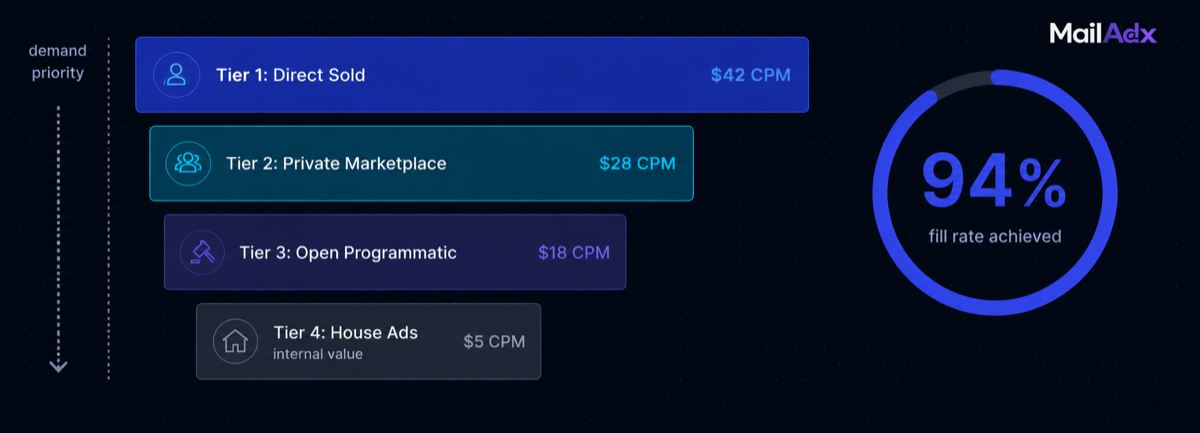
The ad waterfall is the sequence of demand sources your newsletter consults on each subscriber open, in priority order. A well-configured waterfall is the difference between 65% and 94% fill rate on identical inventory. It determines which deals fill first, what happens when they don't, how floor prices interact with demand depth, and how every impression finds its highest-value outcome. This guide covers the complete waterfall configuration in MailAdx — every tier, every setting, and how the tiers interact.
What this guide covers:
How the Waterfall Works
When a subscriber opens a newsletter served by MailAdx, the ad server runs through a defined sequence of demand sources — the waterfall — to find the best eligible ad for that impression. The waterfall runs top to bottom: higher tiers take priority over lower tiers. If a tier provides an eligible ad, it fills. If it doesn't, execution falls through to the next tier. This sequence runs in under 10 milliseconds.
The waterfall is not the same as a sequential selection process. Multiple tiers can be evaluated in parallel for speed, with priority logic applied to the results. What matters to the publisher is the order of precedence: which demand source gets first right of refusal, and what the fallback chain looks like.
For a fuller explanation of why the decision runs at open time rather than send time, see open-time ad serving explained. For the relationship between waterfall configuration and fill rate, see fill rate optimisation.
Tier 1: Direct-Sold Campaigns
Direct-sold campaigns occupy the highest tier of the waterfall. When a direct deal is active — meaning a specific advertiser has purchased guaranteed inventory in your newsletter at a negotiated CPM — that campaign fills first, before any auction or programmatic logic runs.
Direct campaigns in MailAdx are defined by:
Date range: The campaign has a start and end date. Outside these dates, the campaign doesn't compete for impressions.
Impression commitment (optional): If you've guaranteed a specific number of impressions to the sponsor, MailAdx paces delivery to hit that target within the date range. Pacing prevents over-delivery in early sends and under-delivery toward the end of the campaign.
Creative: The image asset uploaded for this specific campaign.
Click URL: The advertiser's destination.
When a direct campaign is active and the subscriber matches (date range, any targeting rules applied), it fills the slot. If no active direct campaign exists, the waterfall moves to Tier 2.
Building and managing direct campaigns is covered in the direct-sold newsletter ads guide, which includes rate card construction, media kit templates, and sponsor management workflow.
Tier 2: Private Marketplace
Private marketplace (PMP) deals sit between guaranteed direct buys and fully open programmatic. A PMP deal gives a specific buyer preferred access to your inventory at an agreed CPM floor, above the open market price — but without the impression guarantee of a direct deal.
PMP deals are configured in the MailAdx publisher portal under Deals. Each deal specifies:
- The buyer (advertiser or DSP)
- The preferred CPM floor — what the buyer has agreed to bid at minimum
- Date range and any targeting conditions
When Tier 1 (direct) doesn't fill, Tier 2 checks whether any active PMP deal has an eligible bid at or above its stated floor. If multiple PMP deals are eligible, they compete — the highest bid wins. If no PMP deal fills, execution moves to Tier 3.
PMP deals are most valuable for publishers with specific advertiser relationships that don't warrant a full guaranteed direct deal — preferred access at a premium price, without the commitment overhead. Many publishers convert direct sponsors to PMP arrangements after a successful guaranteed campaign.
Tier 3: Open Programmatic
Open programmatic is the catch-all demand layer. When no direct or PMP campaign fills, MailAdx runs an open auction among all eligible programmatic campaigns. The highest qualifying bid at or above the placement floor price wins.
The key configuration points for open programmatic:
Floor price: The minimum CPM below which no programmatic impression is served. The floor protects inventory value and acts as a quality filter. Floor prices are configured per placement — header floors are higher than footer floors. The complete floor strategy is covered in the floor CPM guide.
Category blocks: Advertisers in blocked categories cannot participate in the open auction for this placement. Category configuration is covered in depth in the category blocks guide.
Demand depth: The breadth and quality of programmatic demand is a function of audience characteristics, niche, and MailAdx's connected demand sources. B2B newsletters in high-CPM niches attract more competitive bidding than general-interest newsletters.
Open programmatic typically provides 85–95%+ of inventory fill in well-configured accounts. The remaining small fraction falls to Tier 4.
Tier 4: House Ads
House ads are the floor of the waterfall. When no paid demand fills at or above floor price — from any tier — the house ad runs. House ads earn no programmatic revenue, but they serve the publisher's commercial interests: promoting a paid subscription tier, driving referrals, highlighting archived content, or announcing upcoming issues.
House ads are non-negotiable in a well-configured publisher setup. An empty slot — when a paid ad doesn't fill — is never preferable to a house ad. Empty slots look broken, signal to readers that the newsletter runs ads, and waste a conversion opportunity. A house ad that converts 0.5% of clicks to paying subscribers or referrals generates compounding value that outweighs the optionality of showing nothing.
Configure house ads per placement in the publisher portal. Best practices for house ad creative: the same format and visual quality as paid ads, clear labelling as publisher content, a specific call to action with one clear destination.
How Floor Prices Interact with Each Tier
Floor prices apply only to programmatic tiers — Tier 2 (PMP) and Tier 3 (open programmatic). Tier 1 direct deals are not subject to floor checking: they fill at their negotiated rate regardless of whether that rate is above or below the floor.
For PMP deals, the configured preferred floor functions differently from the open market floor. A PMP deal says the buyer has committed to bid at a minimum of X CPM. The open market floor is the absolute minimum for anyone in the open auction. PMP floors can be set above or below the open market floor — the typical arrangement is above, since PMP is a preferred deal.
An example: A publisher has an open market floor of $14 CPM and a PMP deal with an advertiser at $20 CPM floor. When Tier 2 runs, the PMP advertiser's bid is checked against $20. If they bid $22, they win at Tier 2. If they bid only $18 (below their committed floor — unusual but possible), the PMP deal doesn't fill and Tier 3 runs. Tier 3 checks all bids against $14.
Configuring the Waterfall in MailAdx
Waterfall configuration in MailAdx is done through three areas of the publisher portal:
Placements → Floor price: Sets the open market programmatic floor for each placement. Configure separately for header, mid-content, and footer. Start with niche-appropriate floors from the floor CPM guideand adjust as fill-rate data accumulates.
Placements → Category blocks: Sets category exclusions per placement. Consult the category blocks guidefor surgical blocking that maintains fill while protecting reader experience.
Campaigns → New Campaign: Creates Tier 1 direct campaigns. Specify date range, impression target, creative, click URL, and any subscriber targeting conditions. Once created, campaigns automatically occupy Tier 1 priority during their active period.
Deals → New Deal: Creates Tier 2 PMP arrangements. Specify buyer, preferred CPM floor, and date range.
Placements → House Ad: Uploads the fallback creative for Tier 4. One house ad per placement, updated as your promotional priorities change.
Monitoring and Optimising Waterfall Performance
The MailAdx reporting dashboard shows fill rate, eCPM, and revenue broken down by placement and date. To monitor waterfall-specific performance:
Check fill rate trend weekly. A fill rate below 85% after the initial optimisation period suggests either floor prices are too high for current demand depth, or category blocks are eliminating more demand than intended.
Monitor eCPM vs floor. If your eCPM is consistently close to your floor price, demand is thin — multiple advertisers aren't competing aggressively for your inventory. Consider lowering the floor temporarily to attract more bidders, then raise it incrementally as fill-rate data confirms demand depth can support it.
Review direct vs programmatic mix. The dashboard shows revenue by source. If programmatic is providing 95%+ of revenue, direct deal development is the highest-leverage revenue opportunity. If direct campaigns are running consistently but with gaps between campaign periods, programmatic fill during the gaps is performing its intended function.
Seasonal adjustment. Q4 demand is significantly higher than January. Raising floors in October and lowering them in January matches floor calibration to actual demand conditions. See the floor CPM guidefor seasonal adjustment timing.
Frequently Asked Questions
Can I have different waterfall configurations for different placements?
Yes, and this is the recommended approach. Each placement has its own floor price, category blocks, and house ad. The header placement has the highest floor; the footer has the lowest. Direct campaigns can be assigned to specific placements rather than applying to all placements. The waterfall runs independently for each placement on every open.
What happens if a direct campaign has a lower CPM than my programmatic floor?
Direct campaigns fill regardless of floor price — the floor only applies to programmatic tiers. If you've agreed to a direct deal at $30 CPM and your floor is $14 CPM, the direct deal fills at $30. If you've agreed to a direct deal at $10 CPM and your floor is $14 CPM, the direct deal still fills at $10 — it's a committed agreement. This is why rate card review before direct deal negotiations matters: don't commit to direct CPMs below what programmatic demand would provide.
How does frequency capping work across the waterfall?
Frequency caps are applied at the subscriber hash level and span all tiers. If an advertiser's campaign has a weekly cap of 3 impressions per subscriber, the cap counts impressions whether they came from a direct deal, a PMP arrangement, or open programmatic. The cap logic runs before tier selection — if a subscriber has reached the cap for all eligible campaigns, the waterfall may fall through to house ads even if paid demand nominally exists. See how subscriber hash-based capping works.
Configure your demand waterfall
Set up direct campaigns, PMP deals, programmatic floors, and house ads in the MailAdx publisher portal. Full waterfall configuration in one place.


