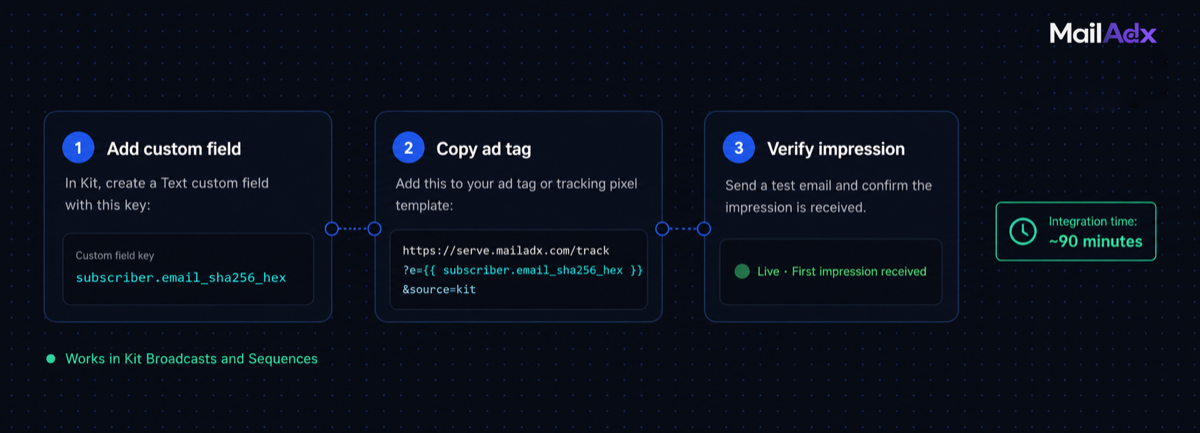
Kit (formerly ConvertKit) is the email platform of choice for creators and online educators — course sellers, coaches, content writers, and community builders who run newsletters as part of a broader creator business. Connecting Kit to MailAdx adds programmatic ad revenue to your newsletter without changing your send workflow or your subscriber experience. This guide covers the complete integration: subscriber hash setup, ad tag insertion into Kit broadcast templates, and how the integration works in Kit's visual automations.
What this guide covers:
Kit's Template Architecture and What It Supports
Kit supports two email content modes: its visual designer (drag-and-drop) and a plain-text mode. For MailAdx integration, you need to insert a custom HTML block, which Kit supports through its "Custom HTML" block type available in the visual designer.
Kit's merge variable syntax uses Liquid-like tags: {{ subscriber.email_sha256_hex }}is the variable that returns the SHA-256 hash of a subscriber's email address. Kit computes this automatically — unlike Klaviyo, you do not need to pre-populate this as a custom field. The hash is computed at send time from the subscriber's stored email address.
One important requirement: Kit's SHA-256 merge variable was introduced in a platform update and may require enabling in your account settings if you're on an older plan. Check Kit's documentation to confirm the variable is available in your account, or send a test email to verify the variable resolves correctly before going live.
Prerequisites
- A Kit account with access to the visual email designer (available on Creator and Creator Pro plans)
- A MailAdx publisher account (create one here)
- At least one existing broadcast template in Kit
Kit's free plan includes broadcast functionality but may have restrictions on custom HTML blocks. If you're on the free plan and the custom HTML block is unavailable, upgrade to Creator plan before proceeding.
Step 1: Enable Subscriber Hash in Kit
Kit computes the SHA-256 email hash natively. You don't need to create a custom field or run a bulk import — the variable {{ subscriber.email_sha256_hex }} is available in all Kit email templates.
Before using it in a live campaign, verify it resolves correctly. Create a test broadcast, add a text block with the content {{ subscriber.email_sha256_hex }}, and send it to yourself. If the variable resolves to a 64-character hex string (a SHA-256 hash), it's working. If it renders as the literal variable text, the variable isn't supported in your Kit plan or has been entered incorrectly.
The hash must be computed from the lowercase version of the email address. Kit handles this normalisation internally — you don't need to do anything special.
Step 2: Create Your MailAdx Placement
In the MailAdx publisher portal, create a new placement:
Placement key: Use a descriptive name like kit_header or header.
Ad sizes: Kit email templates default to 600px width. Standard configurations: 600×90px for a header banner or 600×150px for a mid-content unit.
Floor CPM: Creator newsletters in popular niches (productivity, business, personal finance, software) typically start at $12–18 CPM. Broader lifestyle or general interest newsletters start at $8–12 CPM. The floor CPM guide has niche-specific starting recommendations.
After saving, copy the generated ad tag for use in Step 3.
Step 3: Add the Ad Tag to Kit Broadcasts
Open your Kit broadcast template in the visual designer. Click the "+" icon to add a new block at the desired position (top for header, between content sections for mid-content). Choose "Custom HTML" from the block type menu.
In the HTML block, paste:
<!-- MailAdx ad placement -->
<table width="100%" cellpadding="0" cellspacing="0" border="0"
  style="border-collapse:collapse;">
  <tr>
    <td align="center" style="padding:10px 0 8px 0;">
      <img
        src="https://ads.mailadx.com/serve
          ?pub=YOUR_PUBLISHER_ID
          &pk=header
          &eh={{ subscriber.email_sha256_hex | default: '' }}"
        width="600"
        height="90"
        alt=""
        style="display:block;border:0;max-width:100%;"
      />
    </td>
  </tr>
</table>
<!-- End MailAdx -->
The | default: '' filter ensures the URL renders cleanly for any subscriber whose hash is unavailable. Save the block and the template.
This ad tag works for one-time broadcasts and sequences. No per-campaign action is required — the tag stays in your template and serves current ads to every subscriber who opens the email.
Using Ad Tags in Kit Automations
Kit's automation sequences (automated email series triggered by signup, tag, or event) work with MailAdx ad tags identically to broadcast campaigns. Because MailAdx usesopen-time ad serving, the ad is always current regardless of when the automation email was originally written.
A welcome sequence email written six months ago with a MailAdx ad tag serves a current programmatic ad when a subscriber opens it today. There is no stale creative, no budget overrun from the original campaign, and no manual action required to refresh the advertising.
For Kit creators with substantial automation sequences — welcome sequences for lead magnets, course delivery sequences, nurture sequences — this means ad revenue from automated emails accumulates with zero ongoing management. Every open in every automation earns.
Revenue Strategy for Creator Newsletters
Kit users are predominantly creators and educators whose primary business is not advertising — it is courses, coaching, memberships, or digital products. Newsletter advertising in this context is a supplemental revenue stream, not the core business. This framing has implications for how to configure MailAdx:
House ads serve your own products. When programmatic demand falls below your floor price — which will happen during low-demand periods — your house ad is the most valuable use of that slot. A creator with a $197 course should configure house ads that promote that course to free newsletter subscribers. A single conversion from a house ad impression often outweighs the programmatic CPM for that slot.
Consider direct sponsorships for engaged audiences. Creator newsletters with 5,000–25,000 highly engaged subscribers in a specific niche often command direct sponsorship CPMs of $60–120 — far above open market programmatic rates. Building a minimal direct sponsorship program alongside programmatic captures this premium. See direct-sold newsletter ads.
Category blocks protect the creator brand. For creators who have built trust with their audience, irrelevant or low-quality advertising is a greater risk than for faceless media publications. Configure category blocks carefully to ensure only advertising that aligns with your audience's interests and values can serve. See the category blocks guide.
For a complete picture of newsletter revenue options beyond advertising, see how to monetise your newsletter in 2026.
Frequently Asked Questions
Does the integration work with Kit's landing pages and forms?
MailAdx integration is for email newsletters specifically — it doesn't affect Kit's landing pages or form performance. The ad tag only serves when a subscriber opens an email and their client renders the image. Landing pages and forms are separate contexts.
Will the ad affect my Kit deliverability scores?
No. A standard HTML image element in an email template doesn't trigger spam filters or affect sender reputation. Deliverability is determined by list hygiene, engagement rates, sending domain authentication, and content quality — none of which are affected by an ad serving image tag.
Can I show ads only to free subscribers and not to paying course customers?
Yes. Kit's tagging system lets you maintain separate lists or segments for free and paid subscribers. Configure separate broadcast templates for each segment — the free subscriber template includes the MailAdx ad tag; the paid subscriber template does not. The paid segment receives an ad-free experience as a benefit of their subscription.
What's the minimum subscriber count at which Kit integration generates meaningful revenue?
See the newsletter ad revenue calculatorfor precise numbers by niche. As a rough guide: creator newsletters in focused niches (productivity, business, software) start seeing meaningful programmatic revenue above 5,000 subscribers. Below that, direct sponsorships from within the creator's own network are often the more practical revenue source.
Add ad revenue to your Kit newsletter
Open-time ads in both broadcasts and sequences. No revenue share on direct-sold. Set up in under 90 minutes.
No minimum subscribers · 0% on direct-sold


